On this page
- The four types of AI video tools marketers should know
- How we evaluated these tools
- What AI features actually matter for marketers
- The best AI video editing tools for marketers
- 1. Overlap AI
- 2. Adobe Premiere Pro
- 3. Canva Video
- 4. CapCut
- 5. Descript
- 6. OpusClip
- 7. VEED
- 8. Clipchamp
- 9. Kapwing
- 10. Filmora
- Which tool is right for your team?
- Frequently asked questions
- How does AI video editing help marketers?
- Can these tools handle multiple aspect ratios?
- What matters most when choosing a tool?
- What if AI makes mistakes?
- How do teams scale video production?
- Which tool is best for a high-output marketing team?
AI video editing is no longer one category.
Some tools help social teams turn long videos into short clips. Others help small teams make polished videos quickly. Some focus on text-based editing or browser collaboration. A smaller set tries to automate the full workflow from upload to edit to publishing.
That distinction matters. If you are choosing a tool for a marketing team, the real question is not just “which editor has AI?” It is “which kind of automation do we actually need?”
For most marketers, the goal is simple: make more videos, faster, without losing brand consistency or wasting hours in a timeline.
That is why we evaluated the best AI video editing tools for marketers based on the workflows that actually matter: repurposing long-form content, producing social-ready clips, enforcing brand standards, collaborating across teams, and scaling output without adding headcount.
The four types of AI video tools marketers should know
Before comparing products, it helps to separate them into the categories they actually belong to.
1. Social-first editors
These tools are built for fast social content. They usually include captions, resizing, templates, and lightweight editing.
Best for:
- social teams
- creators
- brands publishing frequent short-form content
2. Repurposing tools
These focus on turning podcasts, webinars, interviews, and long videos into shorter clips.
Best for:
- podcast teams
- webinar marketers
- content repurposing workflows
3. Creative editors with AI features
These are more traditional editing platforms that now include AI features like reframe, cleanup, and captioning.
Best for:
- in-house creative teams
- polished brand campaigns
- editors who still want manual control
4. End-to-end video automation platforms
These tools go beyond editing assistance. They automate more of the workflow across ingestion, clipping, branding, versioning, and publishing.
Best for:
- teams producing high volume
- multi-account brand operators
- marketing orgs trying to scale output, not just speed up editing
How we evaluated these tools
We assessed each tool across the dimensions that most directly affect marketing teams.
Workflow automation
Does the tool simply speed up editing, or does it automate larger parts of the process like clipping, branding, approval, and publishing?
Ease of use
How quickly can a marketer create a publishable asset without a professional editor on the team?
Output for marketing channels
Does it support the formats marketers need, including 9:16, 1:1, and 16:9?
Brand consistency
Can teams enforce logos, fonts, colors, and repeatable creative rules across many videos?
Value for money
Does the pricing make sense for a team producing content every week, not just testing occasionally?
What AI features actually matter for marketers
Not every AI feature is equally useful.
The most valuable capabilities are the ones that reduce repetitive work while keeping output usable.
- Automatic clipping and smart cuts help teams find usable moments without hand-trimming every timeline.
- Captioning and subtitle generation improve accessibility, retention, and platform readiness.
- Auto-formatting and resizing make it easier to publish across TikTok, Instagram, YouTube Shorts, LinkedIn, and more.
- Brand kit enforcement helps teams scale without every asset drifting off-brand.
- Workflow automation matters most when the goal is output volume, not just editor convenience.
The best AI video editing tools for marketers
1. Overlap AI
Category: End-to-end video automation platform
Overlap AI is best for marketing teams that do not just want editing help. It is built for teams that want the workflow itself automated.
Instead of stopping at captions or clip suggestions, Overlap is designed to handle ingestion, editing, branding, and posting in one cloud workflow. That makes it meaningfully different from tools that improve one step of the process but still rely on a human to manage the rest.
This is especially useful for brands, publishers, and media-heavy teams producing lots of short-form content across accounts and platforms.
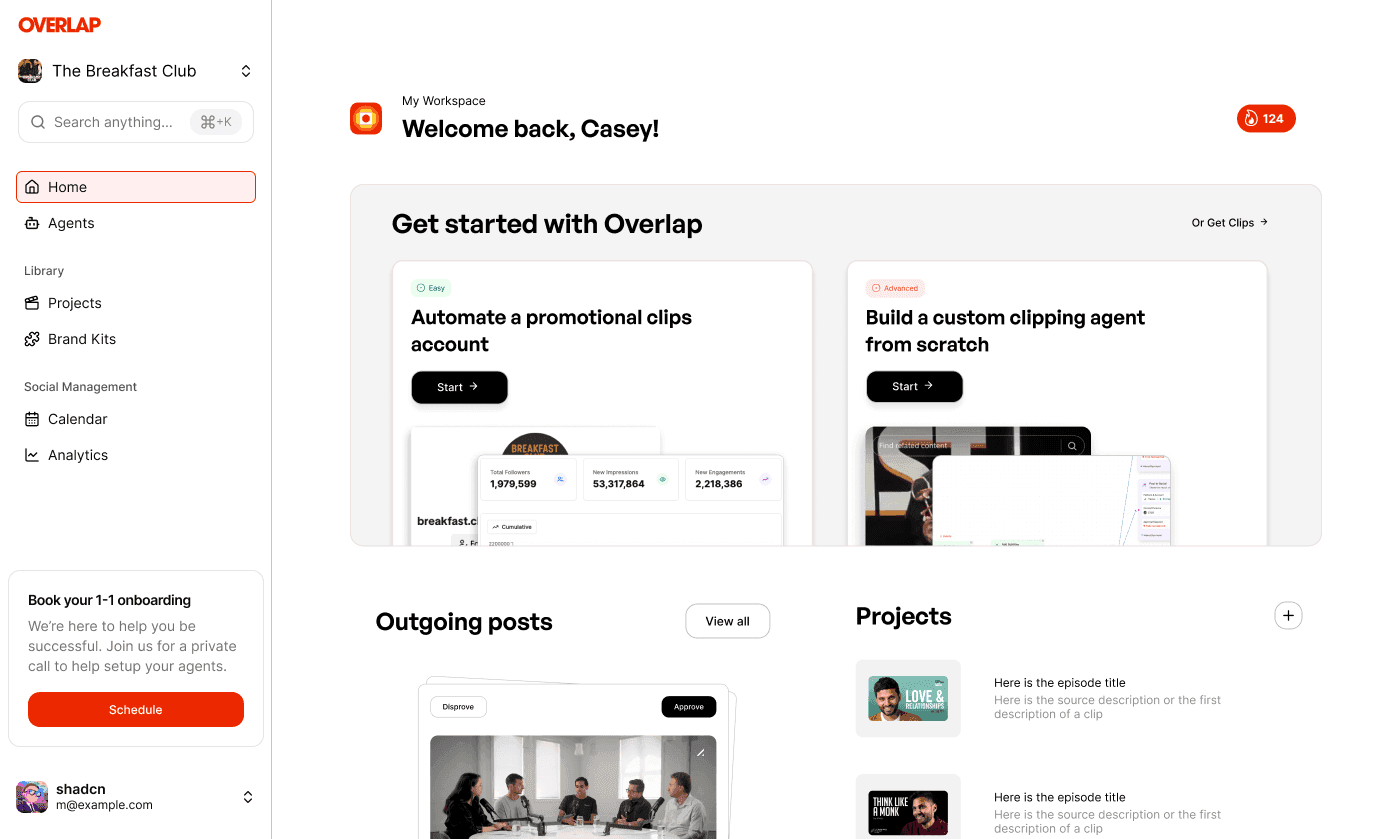
Core features
- Automatic scene detection and smart trimming
- Dynamic brand kit enforcement
- Instruction-based workflows powered by agents
- End-to-end cloud workflow from upload to publishing
- Built-in scheduling and distribution
Pricing
- Not published. Overlap sells entirely through demos and quotes each team against the volume it plans to run, so there is no rate card to compare with the tools below.
Best for
- social media campaigns
- webinar repurposing
- product launches
- high-volume promotional accounts
Pros
- Strongest automation of any tool on this list
- Built for scale, not just faster editing
- Helps maintain brand consistency across many assets
- Useful for teams publishing frequently
Cons
- Broader workflow means slightly more onboarding than lightweight clip tools
Why it stands out Most products in this market make editors a bit faster. Overlap is built to make the whole team more productive.
2. Adobe Premiere Pro
Category: Creative editor with AI features
Premiere Pro remains the strongest fit for professional editors who want maximum control and already work inside Adobe’s ecosystem. Its AI features, including auto reframe and scene detection, are useful, but it is still fundamentally a manual editor.
Core features
- Auto reframe
- AI audio cleanup
- Scene edit detection
Pricing
- Individual: $20.99/month
- Business: $33.99/month per seat
Best for
- polished brand campaigns
- creative teams with editing experience
- Adobe-heavy workflows
Pros
- Powerful and flexible
- Industry standard
- Deep ecosystem and plugin support
Cons
- Steep learning curve
- More manual work than automation-first tools
- Hardware intensive
3. Canva Video
Category: Social-first editor
Canva Video is a good fit for marketers who care more about speed and simplicity than editing depth. It is easy to learn, affordable, and works well for lightweight branded content.
Core features
- Magic Resize
- text-to-video
- auto-captioning
Pricing
- Free
- Pro: $12.99/month
- Enterprise: custom
Best for
- quick social videos
- storyboard-style marketing assets
- lightweight brand content
Pros
- Very easy to use
- Strong template library
- Affordable
Cons
- Limited advanced editing
- Not built for complex video workflows
4. CapCut
Category: Social-first editor
CapCut is strong for fast short-form editing, especially for teams that care about mobile workflows and creator-style content. It is fast and accessible, though less suited to structured team operations.
Core features
- Auto-cut
- background removal
- AI subtitles
Pricing
- Free
- Premium: $9.99/month
Best for
- UGC-style campaigns
- mobile-first editing
- rapid short-form production
Pros
- Fast and affordable
- Great for creator-style content
- Easy to pick up
Cons
- Limited collaboration depth
- Less robust for brand governance
5. Descript
Category: Repurposing and transcript-based editing
Descript is best for teams working with spoken content. If your workflow starts with interviews, podcasts, webinars, or commentary videos, editing from a transcript is a genuine advantage.
Core features
- Transcript-based editing
- filler word removal
- overdub voice cloning
Pricing
- Free
- Creator: $12/month
- Pro: $24/month
Best for
- podcast repurposing
- webinar editing
- caption-heavy workflows
Pros
- Excellent for dialogue-heavy content
- Fast transcript-first editing
- Good audio tooling
Cons
- Less compelling for visual-first editing
- Not built for deep creative polish
6. OpusClip
Category: Repurposing tool
Opus Clip is a focused repurposing product. It is built to pull short clips from longer videos and works well when the job is volume clipping rather than full editing.
Core features
- AI clip generation
- smart highlight detection
- short-form repurposing
Pricing
- Starter: $19/month
- Growth: $49/month
Best for
- podcasts
- interviews
- webinars
- long-form video repurposing
Pros
- Strong at extracting clips quickly
- Easy ROI for long-form content teams
- Minimal setup
Cons
- Limited fine control
- Narrower use case than broader workflow tools
7. VEED
Category: Browser-based social and collaboration editor
VEED is a good browser-first option for teams that need lightweight editing, subtitles, and collaboration without desktop software.
Core features
- Auto subtitles
- subtitle translation
- browser-based effects and editing
Pricing
- Free
- Pro: $15/month
- Business: $30/month per seat
Best for
- multilingual campaigns
- browser-based teams
- quick turnaround editing
Pros
- Easy to access
- Good subtitle tooling
- Useful for distributed teams
Cons
- Less depth than professional editors
- Still more editor than automation platform
8. Clipchamp
Category: Lightweight editor
Clipchamp is best for simple marketing videos and quick exports, particularly for teams already operating in Microsoft environments.
Core features
- AI auto-compress
- storyboard templates
Pricing
- Free
- Creator: $9/month
- Business: $19/month
Best for
- basic marketing videos
- internal demos
- simple export workflows
Pros
- Easy to use
- Good for basic needs
- Microsoft-friendly
Cons
- Fewer differentiated AI features
- Limited for more serious production
9. Kapwing
Category: Social-first collaborative editor
Kapwing works best for quick-turn social content, lightweight collaboration, and meme-style or test content. It is built for speed more than depth.
Core features
- Smart Cut
- AI meme generation
- collaborative browser editing
Pricing
- Free
- Pro: $20/month
Best for
- meme content
- fast campaign tests
- collaborative social teams
Pros
- Fast and collaborative
- Good for lightweight social workflows
- Easy to share and review
Cons
- Not ideal for complex or long-form work
- Less useful for brand-heavy scaling
10. Filmora
Category: Desktop editor with AI features
Filmora is a reasonable middle ground for smaller teams that want desktop editing with some modern AI features but do not need enterprise workflows.
Core features
- AI Portrait
- audio ducking
- effects library
Pricing
- Annual: $39.99
- Lifetime: $69.99
Best for
- small agencies
- solo marketers
- desktop-first editing
Pros
- Affordable
- Stable desktop workflow
- Easy to approach
Cons
- No strong cloud collaboration
- Less differentiated AI automation
Which tool is right for your team?
The right choice depends on the problem you are solving.
Choose a social-first editor if:
You need fast, simple content for social channels and care most about templates, captions, and resizing.
Best fits:
- Canva
- CapCut
- Kapwing
Choose a repurposing tool if:
Your team has an editor and want them to use AI for part of their job.
Best fits:
- Descript
- Opus Clip
Choose a creative editor if:
You need precise manual control and already have skilled editors in-house.
Best fit:
- Adobe Premiere Pro
Choose an end-to-end automation platform if:
Your bottleneck is editing speed, brand consistency, and publishing at scale.
Best fit:
- Overlap AI
Frequently asked questions
How does AI video editing help marketers?
It reduces repetitive production work like clipping, captioning, resizing, and formatting so teams can publish faster.
Can these tools handle multiple aspect ratios?
Most of them can. Strong support for 9:16, 1:1, and 16:9 is now table stakes for marketing use cases.
What matters most when choosing a tool?
Not the length of the feature list. The real question is whether you need editing assistance, repurposing, or workflow automation.
What if AI makes mistakes?
Most tools allow manual review and adjustment. The best systems reduce the amount of cleanup required, but none eliminate review entirely.
How do teams scale video production?
Teams scale by standardizing formats, reusing brand rules, and automating as much of the workflow as possible. That is where workflow-level tools outperform standalone editors.
Which tool is best for a high-output marketing team?
If you want a tool that helps one person edit faster, a clipper or browser editor may be enough. If you want the output capacity of a much larger team, you need a platform built around automation, not just editing features.