What starts it
Kick workflows off manually, on a schedule, or when something new shows up — a YouTube upload, a Dropbox drop, a podcast going live.
5trigger nodes


Explore our library of nodes and real workflow examples to design, customize, and scale your content pipeline.
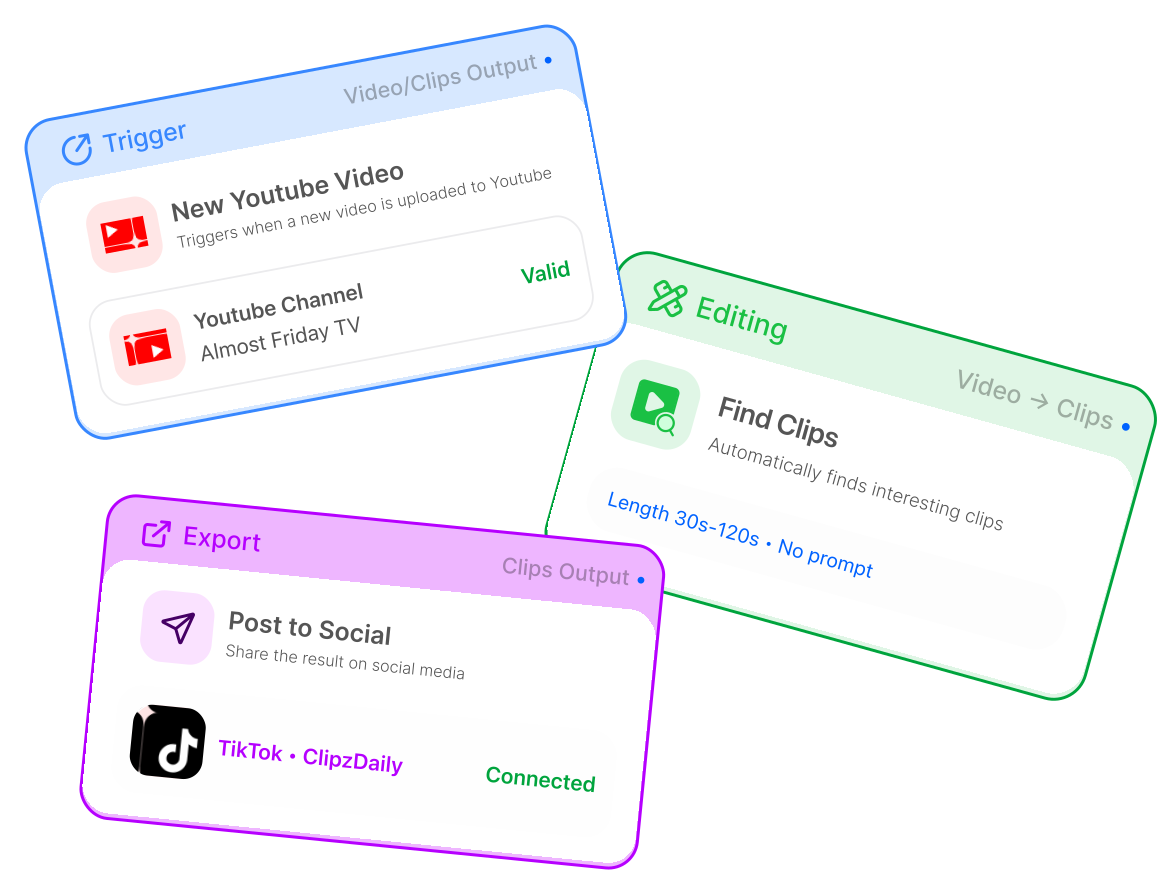
Every Overlap workflow is built from three kinds of nodes working together. Start with a trigger, chain as many edits as you need, then send the finished clip wherever it belongs.
Kick workflows off manually, on a schedule, or when something new shows up — a YouTube upload, a Dropbox drop, a podcast going live.
Find the best moments, reframe to vertical, add captions, B-roll, music, titles, watermarks — every editing step you'd do in a timeline, as a single node.

Ship the finished clip: post to your social channels on schedule, email it to your team, or hand it off to the rest of your stack.

21 nodes, all ready to drop into a workflow.
 Manual TriggerStart a workflow manually whenever you’re ready to process a new video.TRIGGER
 Audio LivestreamAutomatically start workflows when a livestream begins, enabling real-time recording and clipping of live audio content.TRIGGER
 New Dropbox VideoAutomatically trigger workflows when a new video is added to a selected Dropbox folder, enabling instant processing of uploaded content.TRIGGER
 New YouTube VideoAutomatically trigger workflows when a new video is published to a specified YouTube channel or playlist.TRIGGER
 RSS FeedAutomatically start workflows when new content is published through an RSS, Atom, podcast, or blog feed.EDITING
 Find ClipsAutomatically identify and extract the strongest moments from long-form content based on user-defined clip length, model style, prompts, and keywords.EDITING
 Convert to VerticalReformat horizontal video into vertical layouts optimized for TikTok, Instagram Reels, YouTube Shorts, and other short-form platforms.EDITING
 Add AudiogramTurn audio content into a shareable video with waveform visuals, making podcasts, livestreams, and other audio-first content ready for social platforms.EDITING
 Add B-RollEnhance videos with relevant supplemental visuals that make clips more dynamic, polished, and easier to watch.EDITING
 Add BrainrotApply fast-paced, high-engagement overlays designed to make short-form clips more visually stimulating and retention-focused.EDITING
 Add MusicAdd background music to videos to improve pacing, tone, and overall engagement.EDITING
 Add OutroAppend a branded end card to videos so each export can close with a consistent visual identity or call-to-action.EDITING
 Add SubtitlesGenerate and style subtitles for videos to improve accessibility, retention, and performance in silent-viewing environments.EDITING
 Add Title OverlayAdd an on-screen title to clips to highlight key moments, improve thumb-stop appeal, and make videos feel more polished for social platforms.EDITING
 Add WatermarkApply a logo or watermark to videos so every export includes consistent branding.EDITING
 Media OverlayLayer an image or video on top of your content to add visual context, branding, references, or supporting media.EDITING
 Remove Curse WordsAutomatically detect and censor profanity or inappropriate language to make clips safer for publishing and brand use.EDITING
 Remove Filler WordsClean up speech by removing filler words, repeated words, long pauses, and unnecessary transcript punctuation for tighter, more polished clips.EDITING
 Smart ZoomAdd dynamic zoom effects that keep viewers focused on important moments and make clips feel more energetic.EXPORT
 EmailSend workflow results via email.EXPORT
 Post to SocialAutomatically publish content to social media platforms with built-in scheduling and approval controls.
Every one of these is a finished chain of nodes. Open one to see what it automates, how it runs, and which nodes it uses.

Use AI to speed up your short-form video creation, simplify your workflow, and boost your reach across social media.